Visual Storytelling
Images give writing shape. A well-placed diagram can explain in seconds what a paragraph takes a minute to convey. This post shows how to use images in your posts and offers a few practical guidelines for doing it well.
Key points
- Images should support the text, not replace it
- Always write meaningful alt text for accessibility
- Use absolute paths from the site root for reliability
- Optimise file sizes before committing
Adding an image
The standard Markdown syntax works:

Place your image files in the assets/images/ folder and reference them with an absolute path starting from /. The build script copies everything in that folder into the published site automatically.
Diagrams and figures
Diagrams are especially useful for showing how parts of a system relate to each other. Here is a simple diagram of this site's build pipeline:
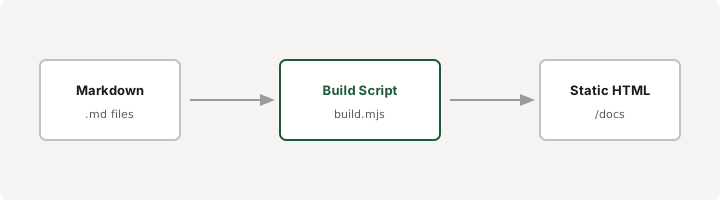
The italic line below the image acts as a caption. There is no special caption syntax in Markdown, but a simple italic paragraph directly after the image works well visually.
Best practices
A few guidelines worth keeping in mind:
- Write descriptive alt text. Screen readers rely on it, and search engines use it to understand your images. Describe what the image shows, not just what it is.
- Optimise before committing. Run images through a tool like Squoosh or ImageOptim. Smaller files mean faster pages.
- Choose the right format. SVG for diagrams and icons. WebP for photographs. PNG when you need transparency with sharp edges.
- Keep images relevant. Every image should earn its place. Decorative images that add no information slow the page down and distract readers.
Image paths
Since posts live at /posts/<slug>/, you might wonder whether to use relative or absolute paths. Absolute paths are simpler and more reliable:
/assets/images/photo.jpgworks from any page depth../../assets/images/photo.jpgbreaks if you move the content
Stick with absolute paths starting from / and you will never have a broken image.
Good visual storytelling is restraint. Use images when they clarify. Skip them when words are enough.